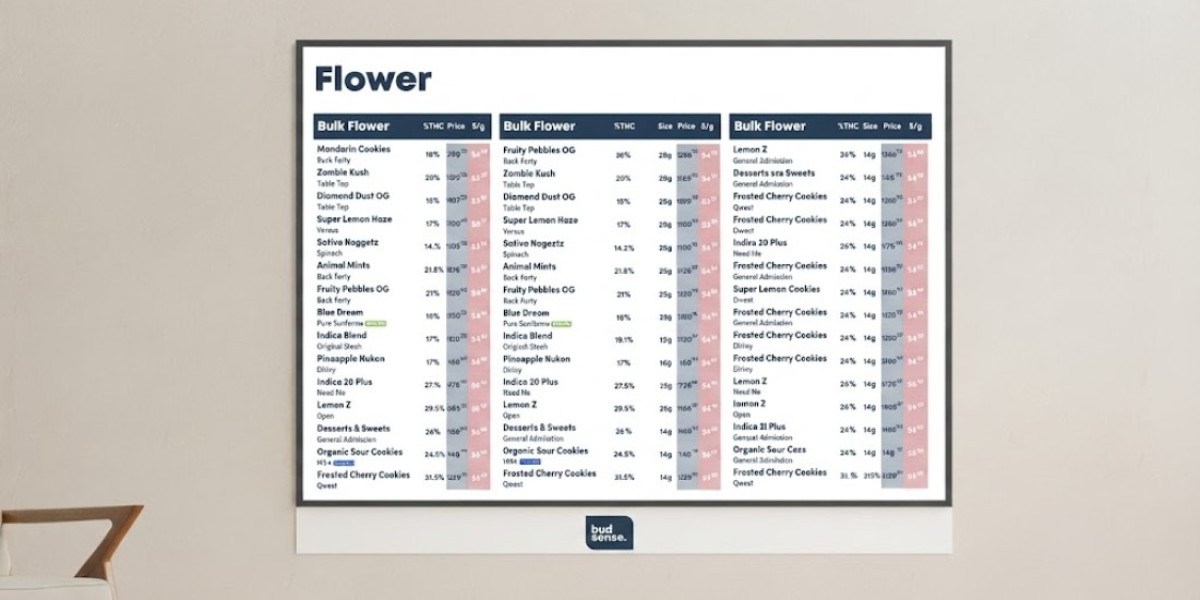

A well-designed cannabis menu should do more than list products. It should help customers compare options, find relevant details, and make sense of a dispensary's selection without feeling overwhelmed. As cannabis retailers manage larger product ranges and changing inventory, flexible menu presentation becomes increasingly important.
This is where BudSense Dynamic Columns can make a practical difference. Instead of forcing every product category into the same fixed layout, dynamic columns give retailers greater control over the information customers see.
From pricing and package sizes to cannabinoid information and product badges, flexible menu columns can help dispensaries create a more organized shopping experience while making day-to-day menu management easier.
What Are BudSense Dynamic Columns?
BudSense Dynamic Columns are designed to give cannabis retailers more flexibility when displaying product information on digital menus.
Different cannabis products have different attributes. A flower product may benefit from THC percentage, CBD percentage, package size, and price-per-gram information. A beverage or edible may require a different combination of details.
A fixed menu layout does not always accommodate these differences effectively.
Dynamic columns allow retailers to choose relevant product attributes and arrange them within their menu presentation.
This approach supports more adaptable Cannabis Menu Design and allows dispensaries to build displays around the information that matters most to their customers.
Why Flexible Cannabis Menus Matter
A dispensary can carry a wide variety of products from multiple brands and categories. If every listing contains too much information, customers may find the menu difficult to scan.
At the same time, removing useful information can make product comparisons harder.
Effective Cannabis Merchandising is about finding the right balance.
Dynamic menu columns can help retailers determine which information deserves attention without filling every screen with unnecessary details.
The result can be a cleaner presentation that supports customer decision-making.
Match Menu Information to Each Product Category
One of the biggest advantages of flexible columns is the ability to adapt menu information to different categories.
For example, flower menus may emphasize:
- THC and CBD levels
- Package size
- Price
- Price per gram
- Brand
- Product type
An edible menu may instead focus on:
- Product format
- Package size
- Price
- Cannabinoid information
- Brand
This category-specific approach makes Cannabis Product Menus more relevant.
Rather than displaying identical fields for every item, retailers can organize information according to how customers actually compare products.
Make Cannabis Pricing Easier to Understand
Price is often one of the first details customers look for when browsing a dispensary menu.
However, the total package price does not always tell the entire story.
For products sold in different quantities, Cannabis Price Per Gram can provide another useful point of comparison when applicable.
Displaying pricing information in dedicated menu columns can help customers quickly distinguish between package price, quantity, and unit-based pricing.
Accurate pricing also matters from an operational perspective. When menu information becomes outdated, customers may receive conflicting information from the screen and sales staff.
Keeping product data synchronized and current should therefore be an important part of Cannabis Menu Management.
Display THC and CBD Information Clearly
Cannabinoid information is another attribute that can be organized through flexible menu layouts.
Using THC and CBD Columns can give customers a clear way to view relevant cannabinoid information alongside other product details.
The information should always be based on accurate product data and presented in a straightforward format.
Good menu design does not require customers to search through large blocks of text. Important details should be easy to locate and compare.
Use Cannabis Menu Badges Strategically
Visual labels can also help products stand out.
Cannabis Menu Badges can be used to identify selected products or communicate relevant distinctions within a menu.
For example, a retailer may use a badge for a new product, a selected category, or another store-defined attribute.
However, visual labels should be used carefully.
If every product has several badges, the menu can quickly become crowded. A simple visual hierarchy usually makes the display easier to understand.
The purpose of a badge should be clear rather than decorative.
Supporting Competitive Pricing Decisions
Pricing is not only a customer-facing issue. It is also an important part of retail merchandising.
Cannabis Competitive Pricing involves considering how products are positioned within the broader market while accounting for factors such as product type, quantity, brand, and store strategy.
A flexible digital menu can make it easier to communicate updated prices and product information.
When retailers have better control over how pricing appears, they can create a more consistent presentation across their customer-facing displays.
Of course, pricing decisions should be based on the retailer's own business data and applicable market considerations.
How Dynamic Cannabis Menus Improve Store Flexibility
Dynamic Cannabis Menus can be particularly useful for dispensaries with frequently changing inventory.
A printed menu may need to be redesigned or replaced when product information changes. Digital menus offer a more adaptable alternative.
With a flexible system, retailers can adjust product information and menu layouts without rebuilding the entire display from scratch.
This can be especially valuable for stores with multiple product categories or multiple screens.
The Role of Cannabis Menu Software
Behind an effective digital menu is reliable technology.
Cannabis Menu Software can help retailers manage product information, organize categories, synchronize data, and control how content appears on digital displays.
For a dispensary team, centralized menu management can reduce repetitive work.
Instead of manually recreating product listings whenever information changes, a software-based approach can provide a more efficient workflow.
BudSense offers digital menu solutions for cannabis retailers, including tools designed to provide greater flexibility over product presentation.
Its Dynamic Columns resource demonstrates how retailers can customize menu information according to their merchandising requirements.
You can read the BudSense Dynamic Columns resource for more information or visit the BudSense website.
Creating Custom Cannabis Menus
Every dispensary has its own product mix and customer expectations.
That means there is no single menu layout that works perfectly for every retailer.
Cannabis Menu Customization gives businesses the ability to adjust their menus according to their inventory and merchandising priorities.
A store with a large flower selection may want to emphasize potency and price-per-gram information. Another retailer may want to give greater attention to beverage sizes, brands, or product formats.
Custom Cannabis Menus can accommodate these differences while maintaining a consistent visual identity.
The key is to customize with purpose rather than adding information simply because it is available.
Best Practices for Using Dynamic Menu Columns
Retailers can get more value from dynamic menus by following a few simple principles.
Prioritize Customer-Relevant Information
Choose columns that help customers compare and evaluate products.
Keep the Layout Clean
Avoid filling the screen with too many attributes. Readability should remain a priority.
Use Consistent Naming
Product attributes should have clear and recognizable labels across the menu.
Keep Data Accurate
Pricing, product information, and other displayed details should reflect current data.
Adapt Columns to Product Categories
Different product types may require different information. A flexible layout should reflect those differences.
Conclusion
BudSense Dynamic Columns provide cannabis retailers with a practical way to make their digital menus more flexible and informative.
By choosing relevant product attributes, dispensaries can create layouts that make pricing, cannabinoid information, package sizes, product details, and other important information easier to compare.
Dynamic columns can also support better Cannabis Menu Management by allowing retailers to adapt their displays as products and merchandising priorities change.
For Canadian cannabis retailers, the combination of flexible design, accurate product information, and dependable Cannabis Menu Software can create a cleaner and more useful digital shopping experience.
Frequently Asked Questions
1. What are BudSense Dynamic Columns?
BudSense Dynamic Columns provide a flexible way for cannabis retailers to organize and display different product attributes within their digital menus.
2. How can dynamic columns improve cannabis merchandising?
They allow retailers to highlight relevant information such as pricing, package size, THC and CBD details, and other product attributes in a structured format.
3. Can dynamic columns be used for different cannabis categories?
Yes. Flexible menu layouts can be adapted to different product categories so retailers can emphasize the information most relevant to each type.
4. Why is cannabis menu customization important?
Cannabis retailers have different inventories and merchandising priorities. Customization allows them to create menu layouts that better match their products and customers.
5. Does Cannabis Menu Software help with menu management?
Depending on the platform, cannabis menu software can help retailers organize product information, manage digital displays, and maintain more consistent menus.