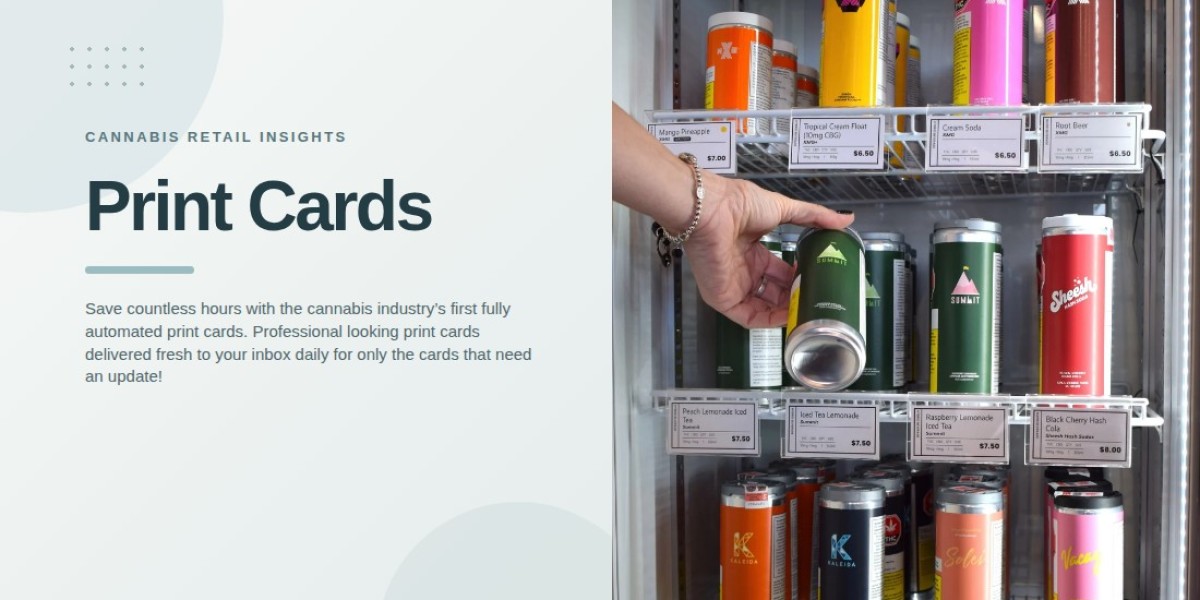

A well-organized retail display helps customers understand the products available without relying on staff for every detail. In dispensaries, a cannabis product card can provide a simple way to identify individual items, highlight important attributes, and separate products into clear categories. When these cards follow a consistent format, customers can browse the display more easily and compare relevant information.
Printed product cards are especially useful when a store carries several brands, product types, or varieties. By combining clear labels with concise information, dispensaries can create displays that look organized while supporting everyday customer questions.
1. Give Every Product a Clear Identity
A product card should help customers understand which item it describes. Product names and brand information should be easy to locate, with enough visual separation to prevent one card from being confused with another.
For example, a display containing several varieties from the same brand may require each card to show the specific product name prominently. Consistent placement of names and identifying details allows customers to scan the display without repeatedly checking packaging.
Retailers should avoid using vague headings that could apply to multiple products. Clear identification makes the display more useful for both customers and employees.
2. Separate Products Into Meaningful Categories
Product cards can help dispensaries organize displays into recognizable groups. Depending on the store's assortment, categories might include flower, pre-rolls, edibles, concentrates, or other product types.
Each category should have a clear purpose. If cards are arranged by product type, customers can focus on the options most relevant to their interests. If a display contains several brands within one category, the arrangement can also help distinguish products from different manufacturers.
The key is to keep the organization intuitive. Too many small categories or inconsistent labels may make a display harder to navigate instead of improving it.
3. Use a Consistent Card Layout
Consistency makes a collection of printed cards easier to scan. When product names, prices, and descriptions appear in predictable positions, customers can compare items without having to learn a new layout for every card.
A practical card design may include:
Product name and brand
Product category
Package size or quantity
Price, where appropriate
Relevant product attributes
A short description, if space allows
Not every card needs every detail. Retailers should select information according to the product type and the purpose of the display. Keeping the structure consistent while adapting the content to each item creates a more coherent presentation.
4. Highlight the Details Customers Need Most
Product cards have limited space, so the most useful details should receive priority. A long description can make the card difficult to read, particularly when several cards sit close together.
Use short, factual descriptions that distinguish one product from another. Depending on the item, this might include flavor, strain name, package quantity, or other relevant characteristics.
Cannabinoid information may also be useful when appropriate, but it should be presented accurately and clearly labeled. Retailers should avoid unsupported claims about effects or health benefits. The purpose of the card is to communicate product information, not to promise a particular experience.
5. Make Price and Package Information Easy to Compare
Customers often review prices and package sizes before deciding which products to consider. Printed cards can make these details more accessible when they are placed consistently across the display.
For products available in different quantities, identify the package size alongside its corresponding price. This helps prevent customers from confusing the price of one option with another.
Retailers should also ensure that prices match current store information. If pricing changes frequently, a reliable update process becomes particularly important. Incorrect prices can undermine customer confidence even when the rest of the display is well designed.
6. Improve Navigation in Busy Retail Displays
A display with many products can become difficult to scan when cards vary in size, wording, or placement. Consistent card dimensions and spacing can help create a clearer visual structure.
Retailers can arrange cards in rows, grouped sections, or designated areas based on their store layout. Category headings may provide additional guidance where several types of products share the same display.
Cards should remain visible without covering packaging information or creating unnecessary clutter. Staff should also be able to identify and replace a card without disrupting the surrounding display.
7. Keep Product Cards Accurate as Inventory Changes
A printed card should describe the product currently available in the display. When a product is discontinued, replaced, or repriced, its card may need to be updated or removed.
Dispensaries can establish a routine for checking card details against their inventory records. This review should cover product names, prices, package sizes, and any other information shown on the card.
For stores operating multiple locations, standardized templates can help maintain a consistent appearance. Centralized tools for managing printed menu materials and product cards can also reduce repetitive formatting work. However, each location should confirm that the information matches its own inventory.
8. Review Card Design Before Printing
Before producing a large batch, review a sample card in its intended display setting. Text that appears readable on a computer may be too small when printed, while low contrast can make important details difficult to distinguish.
Check spelling, spacing, alignment, and the relationship between each card and its product. Ensure that the product name stands out and that supporting details remain readable.
A short review by another team member can help identify confusing wording or inconsistent formatting. Making these corrections before printing multiple copies can save time and reduce waste.
Support Consistent Product Card Management
Clear product cards work best when their design and information remain consistent with the store's broader menu workflow. Dispensaries looking to coordinate printed materials can review BudSense menu software, which provides menu-management solutions for cannabis retailers, including print cards.
Final Thoughts
Printed product cards can make cannabis displays easier to understand by separating products into meaningful categories and presenting key details consistently. Clear names, concise descriptions, readable prices, and accurate package information help customers compare available options without unnecessary confusion.
A regular review process keeps cards aligned with current inventory and retail priorities. With thoughtful organization and consistent formatting, dispensaries can maintain displays that are practical for customers and easier for staff to manage.
FAQs
1. What is a cannabis product card?
A cannabis product card is a printed information card displayed alongside a product. It can identify the item and present details such as its name, brand, price, size, or relevant attributes.
2. How do product cards help organize dispensary displays?
They provide consistent product identification and can separate items into categories, making displays easier to scan and maintain.
3. What information should printed product cards contain?
Useful details may include the product name, brand, category, package size, price, and a short description. The selection depends on the product and available space.
4. How often should dispensaries update product cards?
Cards should be reviewed whenever product details, pricing, or availability change. Regular checks can also catch errors that were missed during printing.
5. How can dispensaries keep product cards consistent across locations?
Using standardized templates and a shared design process can help maintain consistent formatting. Each store should verify its product information before displaying the cards.