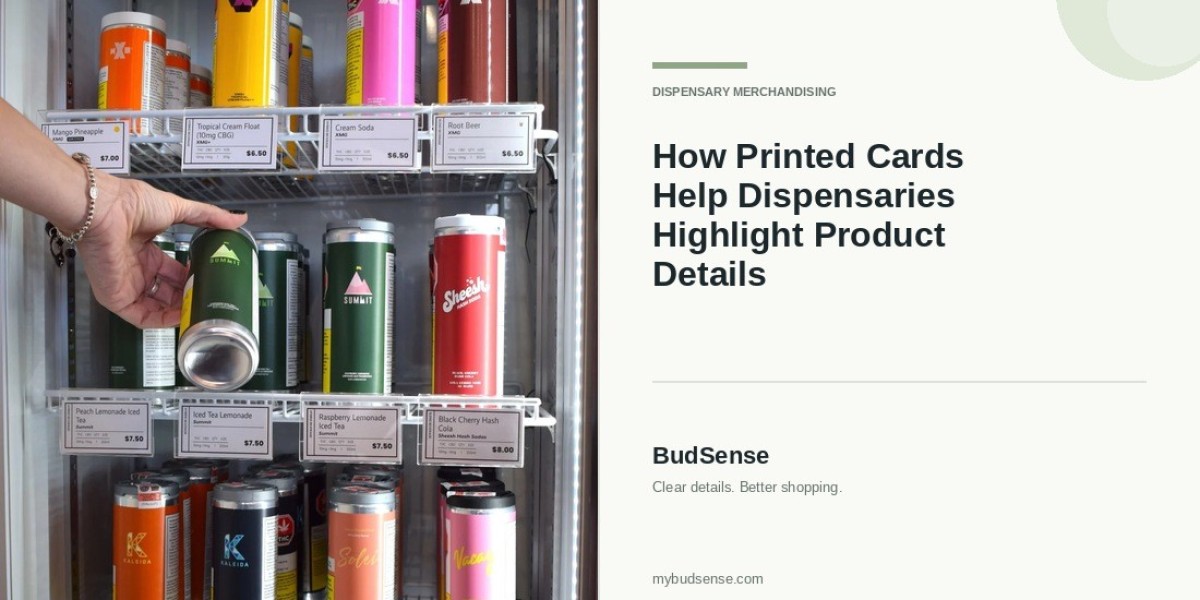

Dispensaries sell products with varying features, prices, and characteristics. Clear product information can help customers review important details before speaking with staff or making a purchase decision. Cannabis print cards allow retailers to present pertinent information beside products so customers can easily reference details while browsing.
Printed cards create an easier-to-understand product display and give employees a handy reference when answering questions if designed correctly.
Benefits of Including Cannabis Printed Product Cards in Displays
1. Make Important Product Details Easy to Read
Customers frequently want to scan relevant information about a product before speaking with a budtender. Printed cards allow dispensaries to display important details like product names, brands, pricing, and other useful product characteristics in a single location.
Customers should be able to identify key information by scanning the layout. Instead of reading long descriptions on packaging, they can find cardstock placed near the product or within its display.
Dispensaries should include only the most useful information customers will likely want to read. Cards with large blocks of text can be difficult to scan, but removing important details could leave a customer without answers. Product cards should balance details with white space to keep customers engaged.
2. Help Customers Compare Different Products
Product comparisons are common in any retail setting. Someone may want to know how brands, prices, product formats, and other features compare before settling on an option that matches their preferences.
Printed cards simplify the comparison process when displayed using a similar format. Customers know where to find product names, prices, and descriptions if these elements appear in the same location on every card.
Dispensaries can place multiple products from the same category side-by-side using matching cards. Such consistency lets customers easily spot similarities and differences while maintaining an organized display.
Employees also benefit from displaying consistent information when explaining product differences to customers.
3. Organize Product Displays More Effectively
It’s easier for customers to browse a dispensary when shelves and displays are organized. Cannabis printed cards allow retailers to clearly identify each product, separate categories, and provide customers with details without over-cluttering packaging.
Employees can arrange cards by product type, brand, or another organizational system that suits the display. Keeping cards in the same location communicates to customers which details apply to each product. Labels mixed throughout a display can lead to unanswered questions.
Card size and placement matter, too. Cards shouldn’t obscure product names or pack displays to the point shelves feel cluttered. Fonts must be large enough for reading, and plenty of space should separate elements like headings and bullet points.
Product cards help employees, too. When information is organized consistently, less time is spent explaining where to find basic details.
4. Include Relevant Information Without Overcrowding Cards
The best product cards provide customers with enough information to make educated decisions but remain readable. Retailers may need to include the product name, brand, price, category, and other characteristics that describe the product.
Dispensaries can add cannabinoid content or helpful information on terpenes when applicable. Cannabis shops should double-check that staff enters information correctly and explain terminology customers may not understand.
Remember to limit the amount of text on each card. Small fonts, oversized descriptions, and poor formatting can make it difficult for customers to understand product cards. Retailers should focus on essential information and use formatting to distinguish headings from sub-points.
Cards that use white space and a simple layout often communicate more information than cards crammed with too many details.
5. Maintain Consistent Branding Across Product Cards
Product cards reflect the store’s overall branding. Using consistent colors, fonts, headings, and card layouts creates a cohesive look that customers begin to recognize on each aisle and display.
Establishing a standard template also makes it quicker to prepare new cards while keeping existing displays uniform. Updating product information doesn’t require employees to redesign each card.
When selecting colors and fonts, keep readability in mind. Decorative elements are nice to have but shouldn’t distract from pricing, product names, or other important details. Simple cards allow customers to focus on what they need without getting overwhelmed.
Large dispensaries with multiple locations can use identical templates to brand every store. Individual stores can then display their own inventory without affecting the overall look and feel.
6. Keep Product Information Accurate
Customers notice when printed cards contain incorrect information. Errors in pricing, out-of-date descriptions, and details that appear on the wrong card create more work for employees.
Develop a routine that requires employees to double-check cards whenever the inventory changes. Someone should verify product names, scan prices, review key product details, and remove old cards from discontinued products.
Creating a central resource for product information can also reduce mistakes. Employees who prepare cards using the same approved records will introduce fewer inconsistencies across displays.
Display checks become even more vital as a dispensary grows its inventory. Large stores with frequent rotation should consider how to keep displays accurate and up-to-date.
7. Make Product Information Easier for Staff to Manage
Designing and printing individual cards is cumbersome when the store offers hundreds of products. Employees are tasked with gathering product information, formatting descriptions, triple-checking prices, and more.
Standard templates simplify product card creation. Staff can use an established process to keep card layouts consistent instead of spending unnecessary time tweaking designs.
Management should determine who is responsible for verifying card information ahead of time. Assigning clear responsibilities ensures someone routinely checks for mistakes before printed cards reach displays.
Establishing a repeatable process gives employees more time to help customers and less time organizing unnecessary details.
8. Choose a Practical Approach to Cannabis Printed Product Cards
Dispensaries operate differently, have varying display requirements, and not every store carries the same volume of product. A small shop may create a single card template, but large dispensaries with multiple departments need an organized system for producing and maintaining cards.
Think about how product information is gathered, stored, updated, and accessed when establishing a printing workflow. Employees should be able to create and replace cards quickly without disrupting daily operations.
Retailers exploring ways to organize printed product cards can visit BudSense and discover how its cannabis retail menu and print solution streamlines the menu item creation process. Don’t forget to choose an option that allows staff to create organized, reader-friendly cards.
Conclusion
Dispensaries can use printed product cards to display important information in an easy-to-read format. Cards allow customers to review pertinent information, compare product details, and maintain consistency across shelves and aisles.
Accurate information is also critical for dispensaries hoping to gain customers’ trust. Providing customers with readable cards and establishing a method for regular reviews will keep product information organized.
FAQs
1. What are cannabis print cards used for?
Cannabis print cards are placed near products in dispensaries and feature useful information about those products. Things like names, brands, price and other pertinent product info can be included on these cards.
2. What information needs to go on a dispensary product card?
This will vary, but most cards feature the products name, brand, price, category and other relevant product information. The key is to provide accurate, useful information that's easy to read.
3. How do printed cards allow customers to easily compare different products?
If the cards are formatted similarly, customers can scan the same areas on each card to see how products are similar and different. Variables line price, ingredients and description should be in the same spot on each card.
4. How often should dispensaries be updating printed product cards?
Ideally, cards will be checked whenever there is a change to any of the relevant information about the product or the price changes. Checks like this can also be used to identify missing or outdated cards.
5. How can dispensaries standardize their printed product cards?
Implementing templates, using approved product records, standardizing formatting and developing a regular review process can help.