
A Successful First Impression Is Only the Beginning
Augmented reality can make an immediate impression. A digital object appearing within a real environment, a product model responding to movement, or an interactive element emerging through a smartphone camera can quickly capture someone's attention. For businesses exploring immersive technology, these moments often provide an exciting introduction to what augmented reality can accomplish. However, an impressive demonstration and a genuinely useful customer experience are not necessarily the same thing.
An AR demo is usually designed to show a concept, highlight a technical capability, or communicate an idea within a controlled setting. It might feature a single product, a carefully prepared environment, and a short interaction that demonstrates the technology's potential. A useful AR experience has a broader responsibility. It must help someone accomplish something meaningful, whether that involves understanding a product, comparing alternatives, visualizing an object in a room, or accessing additional information.
This distinction becomes important when businesses move beyond experimentation and begin introducing augmented reality into their everyday operations. A demonstration can succeed because people are curious about the technology. A lasting experience must offer enough practical value for people to want to use it again or recommend it to others.
Creating that value requires more than technical execution. It involves understanding customer needs, designing interactions around real tasks, preparing suitable digital assets, and making the entire process accessible. The difference lies in the purpose behind the experience and how effectively the finished result serves that purpose.
Curiosity Gets Attention, but Purpose Keeps People Engaged
The first interaction with an AR demonstration often begins with curiosity. Users want to discover what happens when they point a camera at a marker, open a link, or place a digital object within their surroundings. This sense of discovery can generate excitement, especially when the technology behaves in an unexpected way.
Yet curiosity usually has a limited lifespan. Once users understand the basic effect, they begin looking for a reason to continue. If the experience offers no additional information or meaningful interaction, they may close it after a few seconds. The demonstration has delivered its surprise, but it has not necessarily helped them make a decision or complete a task.
A useful experience starts with a more specific question: what should the user be able to do after opening it? For an online furniture store, the answer might be to judge whether a table suits a particular space. For a consumer electronics brand, it could be to explore the physical design of a device before buying it. For a museum, the goal might be to explain an object through contextual information and interactive storytelling.
These goals influence every subsequent design decision. They determine which features deserve attention, how much information should appear on the screen, and what kind of interaction is appropriate. Instead of adding effects simply because they are technically possible, teams can concentrate on features that help users achieve the intended outcome.
When the purpose is clear, augmented reality becomes more than an entertaining visual layer. It becomes a practical part of the customer's journey.
Designing Around Real Questions Instead of Technical Possibilities
Technology-led projects often begin with a list of capabilities. A team may want to experiment with object placement, animated models, interactive labels, or camera-based recognition. Although these capabilities can be valuable, selecting them before understanding the audience may produce an experience that looks impressive but solves the wrong problem.
A better starting point is customer research. Businesses should examine the questions people commonly ask, the details they struggle to understand, and the moments when uncertainty interrupts their decision-making. Customer support conversations, product reviews, sales discussions, and website behavior can all reveal opportunities for more helpful visual communication.
Consider a business selling decorative lighting. An initial AR demo might allow users to place a lamp in a room and rotate it from different angles. A more useful version would consider the actual questions buyers have. They may need to understand the lamp's approximate dimensions, compare its appearance with different interior styles, or access information about available finishes. The experience should make these tasks straightforward without overwhelming users with unnecessary controls.
A company creating educational AR content may have different priorities. Its audience might need explanations that appear alongside physical objects, guided steps that clarify a process, or contextual information that becomes available at a particular location. In this case, the quality of the experience depends on how clearly the content supports learning.
Research does not need to be complicated. A small number of user interviews, simple prototype tests, or observations of existing customer behavior can expose problems before significant development work begins. The goal is to understand the task well enough that the technology supports it naturally.
Content Quality Determines What Users Can Learn
Even a well-designed interface cannot compensate for inaccurate or incomplete content. In product-focused AR, the digital representation must communicate the characteristics that matter to the customer. Incorrect proportions, unrealistic colors, missing components, or misleading material details can create confusion instead of reducing it.
This makes asset preparation a central part of experience design. Teams need to determine which source materials are available and how reliably those materials represent the real object. Depending on the project, useful inputs may include product photography, technical drawings, measurements, existing 3D models, written specifications, and reference images.
Emerging text to augmented reality workflows can offer new ways to develop interactive concepts from written instructions or descriptions. A team might use a text-based brief to explore an educational scene, outline a product presentation, or develop an early idea for an immersive campaign. This can help shorten the distance between an initial concept and a testable prototype.
However, turning a description into an experience does not automatically ensure that the result is factually correct or suitable for customers. Written instructions may omit important dimensions, environmental conditions, or details about how an object should behave. Generated content therefore needs to be checked against the project's requirements.
The right standard depends on the purpose. The more a customer relies on an experience to evaluate a real product or make an important choice, the more carefully its content should be validated.
Removing the Obstacles Between Opening and Understanding
An AR experience may offer valuable information and still fail because the route to accessing it is inconvenient. Users can lose interest when they encounter unclear instructions, unnecessary registration, confusing permissions, or a lengthy setup process. These problems can be particularly damaging when the experience is intended for people who have never used augmented reality before.
Accessibility begins before the interactive content appears. Customers should understand what they are opening, what they need to do, and what they can expect to see. Instructions should be brief, recognizable controls should perform predictable actions, and the experience should provide helpful guidance when a step is necessary.
Browser-based AR can make access easier in suitable use cases because customers may be able to launch an experience through a link on a compatible device rather than downloading a dedicated application. A link can be shared through an ecommerce page, a product label, a QR code, a digital advertisement, or a printed brochure. This gives businesses more opportunities to connect existing marketing materials with interactive content.
Nevertheless, browser access alone does not guarantee usability. The experience still needs to load reliably, fit different screen sizes, and work within the capabilities of supported devices. Large digital assets may need optimization, and users should not be left without an alternative if their device cannot run the experience.
Businesses should also consider the environment in which the technology will be used. A person browsing a product at home may have time to explore several features, while a visitor at a busy retail display may want immediate information. The most effective access design reflects the circumstances of the audience rather than assuming that every user has the same amount of time and patience.
Interaction Should Have a Clear Job to Perform
Adding more interactive features does not automatically improve an AR experience. Every control introduces another decision for the user, and unnecessary options can make even a simple task feel complicated. A successful design includes interactions that serve a recognizable purpose.
For instance, rotating a model can help someone examine its shape. Changing a product finish can support comparison. Placing an object in a real environment can help a customer consider its visual relationship with nearby furniture. Tapping a label to reveal technical details can provide extra information without crowding the initial view.
Each of these interactions addresses a particular need. By contrast, decorative animations or complicated gestures may contribute little if they do not improve understanding. They can even distract users from the information the business wants to communicate.
The order of interactions also matters. An experience should guide users toward the most useful action first, then make additional details available when needed. Someone examining a product might begin with placement or rotation before exploring dimensions and specifications. A guided educational experience may introduce the main concept before offering optional background information.
Good interaction design allows people to explore without feeling forced into a predetermined sequence. Some users want a quick answer, while others enjoy examining every available detail. Providing a clear starting point and enough freedom to investigate helps accommodate both groups.
The objective is not to maximize the number of interactions. It is to make each interaction worthwhile.
Testing in the Conditions That Matter
A demonstration is often presented in a controlled environment. The lighting is suitable, the device is known, the internet connection is stable, and the person operating the experience may already understand how it works. Real customers introduce a much wider range of circumstances.
They may use older smartphones, connect through inconsistent networks, encounter distracting surroundings, or open the experience without any prior explanation. A feature that works perfectly during an internal presentation might behave differently when exposed to these conditions.
Testing should therefore include representative devices, different screen sizes, realistic network conditions, and users unfamiliar with the project. Teams should observe where people hesitate, which instructions they overlook, and whether they can complete the intended task without assistance.
Performance deserves special attention. Long loading times can interrupt the experience before users see its value. Poorly optimized models may respond slowly, while inaccurate placement or difficult controls can reduce confidence. These problems are not merely technical inconveniences; they directly affect whether the experience fulfills its purpose.
Accessibility testing should also account for people with different abilities and preferences. Text must remain readable, important information should not rely entirely on color, and essential instructions should be easy to understand. Where possible, conventional product information should remain available alongside interactive content.
Testing is most useful when it leads to concrete changes. If several users misunderstand the same control, the design should be reconsidered. If a model takes too long to load, its size or delivery method may need adjustment. Repeated observations can turn an experimental prototype into a dependable customer-facing tool.
Measuring Whether the Experience Actually Helps
Launch day is not the final measure of success. A demonstration may receive positive reactions because it is novel, but those reactions do not establish whether it improves the user's ability to understand a product or complete a task.
Businesses need measurements that reflect the original objective. If the experience is designed to support product evaluation, teams might examine whether users explore relevant details, spend time comparing variants, or proceed to the next step of the buying journey. For educational applications, successful completion of learning activities or improvements in comprehension may be more meaningful.
Engagement metrics should be interpreted carefully. A longer session does not always indicate a better experience; users might simply be struggling with confusing controls. Likewise, a short session could indicate that someone found the answer quickly. Behavioral data becomes more useful when combined with usability observations, customer feedback, and the intended outcome.
Companies can also compare different versions of an experience. One version might offer a simple model view, while another includes contextual instructions or product comparisons. Testing these alternatives can reveal which elements contribute genuine value and which add complexity without improving results.
Privacy should remain part of the measurement plan. Businesses should collect only the information they need, communicate relevant data practices clearly, and handle customer information responsibly. A useful AR experience should earn trust through its design and operation, not require unnecessary data collection.
Continuous evaluation gives teams a way to improve the experience after release. Instead of assuming the original design is final, they can use evidence to identify new requirements and prioritize the changes that matter most.
Treating AR as an Ongoing Service, Not a One-Time Project
A prototype can be completed and presented as a single deliverable. A useful AR experience often requires continued attention because the products, information, devices, and customer expectations surrounding it can change.
A retailer may introduce new product variants, revise dimensions, or discontinue an item. An educational organization may update its material as new information becomes available. A marketing team may need to adapt an experience for a new campaign or distribution channel. If these changes are difficult to manage, the experience can gradually become outdated.
Businesses should plan for maintenance from the beginning. They need a clear process for updating content, reviewing accuracy, fixing technical issues, and checking that links continue to work. Reusable assets and consistent publishing procedures can make these responsibilities easier to manage across larger collections of experiences.
Ownership should also be clear. Designers, product specialists, marketers, and technical staff may all contribute to the same project, but someone needs to be responsible for deciding when an experience is ready and ensuring that later updates meet the required standards.
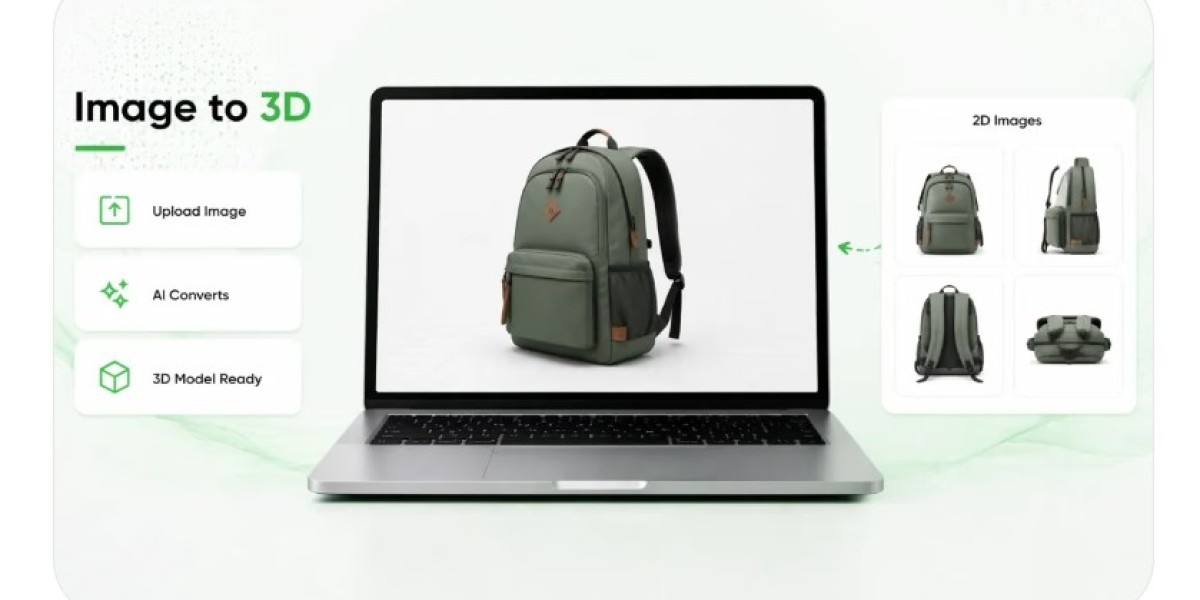
The same principle applies when businesses use Text to 3D technology to generate models from prompts. Automated modeling can support concept exploration and reduce some manual work, but the result may require adjustments to geometry, scale, surface appearance, or individual components. A model created for visual brainstorming may be perfectly adequate for an early demonstration while remaining unsuitable for a product page where accuracy directly influences purchasing decisions.
Moving From Technical Possibility to Practical Value
Building an AR demo can be an effective way to explore new technology, communicate a concept, and demonstrate what an interactive digital layer can achieve. It provides a starting point, but it does not automatically produce something customers will find useful.
A valuable experience emerges when businesses connect technical capabilities with a real purpose. The content must be accurate enough for its intended use, interactions should answer meaningful questions, access should be straightforward, and performance must hold up outside controlled demonstrations. Testing and measurement then reveal whether the experience is delivering the expected benefits.
Automation and emerging content-generation tools can help teams experiment more quickly, while browser-based delivery can reduce barriers for suitable customer-facing applications. Neither replaces the need for careful planning, accurate information, and thoughtful design.
The most effective AR projects begin with a simple principle: technology should make an existing task easier, clearer, or more informative. When teams use that principle to guide decisions from the first prototype through long-term maintenance, augmented reality can develop from a memorable demonstration into a dependable part of the customer experience.